1. Open your word document type your topics and save it.

2. Click File on the menu bar.

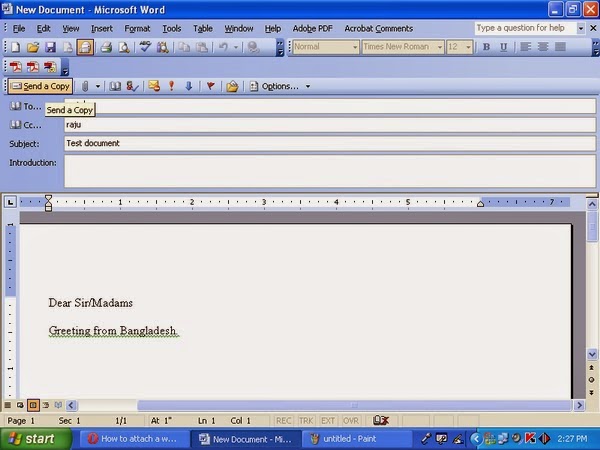
3. Select send to - Mail Recipient.

4. Above your word document you should now see an email
tool bar that is full of
icons that you
are used to seeing in Outlook. Just fill it out as you would to send
any email.

5. When you are done filling address line and the SUBJECT click to
send your email.
Remember:
Your word document will be turned into an email automatically.
The recipients will not need to open it as an attachment or anything. The
size of the file will also be smaller which will help those who have full
mailboxes.
1. PDF
File open and click file

2. Click
saves as

3. Save as type select

4. Select JPEG

5. Create
New Folder

6. New Folder Name or Rename

7. File
Name

8. Save click

Finish.
Firstly Go to
the location of the files you want to print.
1. Select
all of the files that you want to print.

2. Right
click on the selected files.

3. Select
“Print” from the menu that appears.
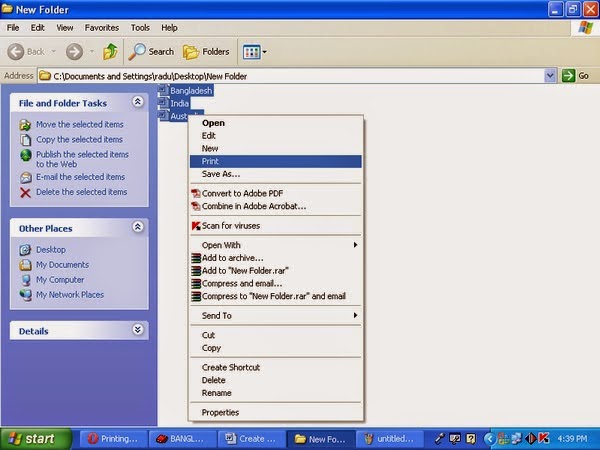
MS Word
will automatically open each file and rather rapidly print them.
1. Create
New Folder

2. Click
on the folder and press F2 for rename

3. Erase
New Folder Text and then press Alt key+0160

Now click
anywhere. Folder is created with a blank name

Microsoft
Excel Most Important Shortcut Key
Excel
Shortcut Keys
|
Description
|
F2
|
Edit the
selected cell
|
F3
|
After
a name has
been created F3 will paste names.
|
F4
|
Repeat
last action. For example, if you changed the color of text in another cell
pressing F4 will change the text in cell to the same color.
|
F5
|
Go to a
specific cell. For example, C6.
|
F7
|
Spell
check selected text or document.
|
F11
|
Create chart from
selected data.
|
Ctrl +
Shift + ;
|
Enter
the current time.
|
Ctrl + ;
|
Enter
the current date.
|
Alt +
Shift + F1
|
Insert
New Worksheet.
|
Alt +
Enter
|
While
typing text in a cell pressing Alt + Enter will move to the next line
allowing for multiple lines of text in one cell.
|
Shift +
F3
|
Open the
Excel formula window.
|
Shift +
F5
|
Bring up
search box.
|
Ctrl + 1
|
Open the
Format Cells window.
|
Ctrl + A
|
Select
all contents of the worksheet.
|
Ctrl + B
|
Bold
highlighted selection.
|
Ctrl + Z
|
Undo
last action.
|
Ctrl +
F3
|
Open
Excel Name
Manager.
|
Ctrl +
F9
|
Minimize current
window.
|
Ctrl +
F10
|
Maximize currently
selected window.
|
Ctrl +
F6
|
Switch
between open workbooks or windows.
|
The terms bit and byte are same in
computer networking. Both terms refer to digital data transmitted over a
network connection. Bits and bytes both may represent network addresses or port
numbers.
Bit: A bit is a single numeric value, either '1' or ‘0’ that encodes a
single unit of digital information.
Byte:
A byte is a sequence of bits; usually eight bits equal one
byte.
Cloud Computing:
Thus your computer has died .
Your external hard drive was stolen from your car. Then your house burned down. By all rights, you’re having a total fail
of an afternoon. But by backing up your computer’s data to the cloud, none of
these traged ies need cost you your precious memories. cloud storage Simply, backing up data to the cloud means you’re backing
up data to our secure servers via your Internet connection, instead of just to
a hard drive in your home or office. Using cloud backups, you’ve removed from your shoulders the burden and stress of
protecting whatever device your data is stored
on.


