Showing posts with label Ms Word. Show all posts
Space
Bar Deleting Letters
Some times we facing
critical problem when we press the space bar it deletes the letters in front of
it.
Solution Tips:
1. The Insert Key
toggles the over-type (OVR) facility, which can also be turned on or off by clicking on the OVR button on the
Status Bar.
2. You may also have
to go into
Tools menu
Options command
Edit tab
Check the Use the
INS key for paste
Checks the overtype
mode uncheck options.
3. You have somehow
gotten your session into Overwrite mode press the “Insert” key on your keyboard
to switch back to "Insert" mode.
4. You can also
change modes just by clicking on the indicator in the status bar.
Function Key
Shortcut Keyboard Key
F1 =
Microsoft Office Help Menu
F2 =
File or Folder Name Rename
Qtrl+F2 =
Print Preview
F3 =
Search Option
F4 =
Last Action Performed Again Repeat
Alt+F4 =
Running Program Close
Ctrl+F4 =
Running All Window Close
F5 =
Any Browser Site Refresh, Find, Replace, Go To Window Open
F6 =
Browser Web Address Select.
Shift+Ctrl+F6 = Running another Word Document Open
F7 =
Spelling and Grammar Check.
Shift+F7 = Spelling Alternatives Option.
F8 =
Windows Safe Mood Option
F9 = Quark Express Measurement
Tool Bar Open.
F10 = Browser Menu bar Select
Shift+F10
= Web Site Select and Right
Click
F11 = Web Browser Full
Screen.
F12 = Open Word Save as
Window
Ctrl+Shift+F12
= Word File Print command
Firstly Go to
the location of the files you want to print.
1. Select
all of the files that you want to print.

2. Right
click on the selected files.

3. Select
“Print” from the menu that appears.
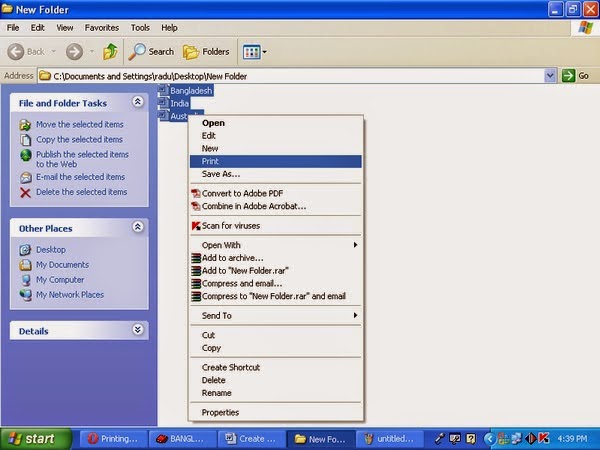
MS Word
will automatically open each file and rather rapidly print them.
1. PDF
File open and click file
 |
2. Click
saves as

3. Save as type select

4. Select Microsoft Word (document)

5. Create
New Folder

6. New Folder Name or Rename

7. File
Name

8. Save click

9. Finish.
|


